Mouse + keyboard together
Repeat clicks while holding a key, or run independent actions side by side.
 CURSORCLICKER
中文
CURSORCLICKER
中文
CursorClicker is a free auto clicker and key presser for Windows. Repeat or hold the left mouse button and keys, combine actions, and give each strategy its own timing and shortcuts.
v1.11 · Windows 10/11 x64 · .NET 8 Desktop Runtime x64
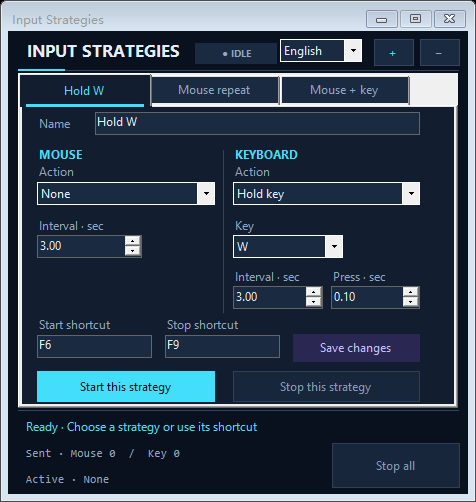
Built for precise, repeatable input
Repeat clicks while holding a key, or run independent actions side by side.
Start and stop every tab with its own hotkeys. Ctrl+Alt+F12 stops all strategies.
Tune timing and press duration in one panel. Switch between English and Chinese in the app.
Create a tab and choose mouse and keyboard actions.
Set timing and unique start/stop shortcuts.
Bring your target app forward, then press the start shortcut.
Download the ZIP, extract all files, then open RobloxCursorClicker.exe. This release is free to use with no account or payment required.
If Windows asks for .NET, install the .NET 8 Desktop Runtime x64. Get it from Microsoft ↗